Gelato Web3 Functions
Overview
Gelato's Web3 Functions is a powerful automation system designed to streamline and enhance Web3 operations. Web3 Functions serve as a comprehensive tool, enabling developers to effortlessly set up, manage, and automate their smart contract tasks. Determining your Needs
Off-chain Data or Computation? Sometimes, automation tasks require data that isn't readily available on the blockchain, or they might need computations that are better performed off-chain. In such cases, Typescript Functions should be the choice.
All Checks On-chain? If all the conditions necessary for your automation task can be directly verified on the blockchain, you have the option to select between Typescript Functions, Solidity Functions & Automated Transactions
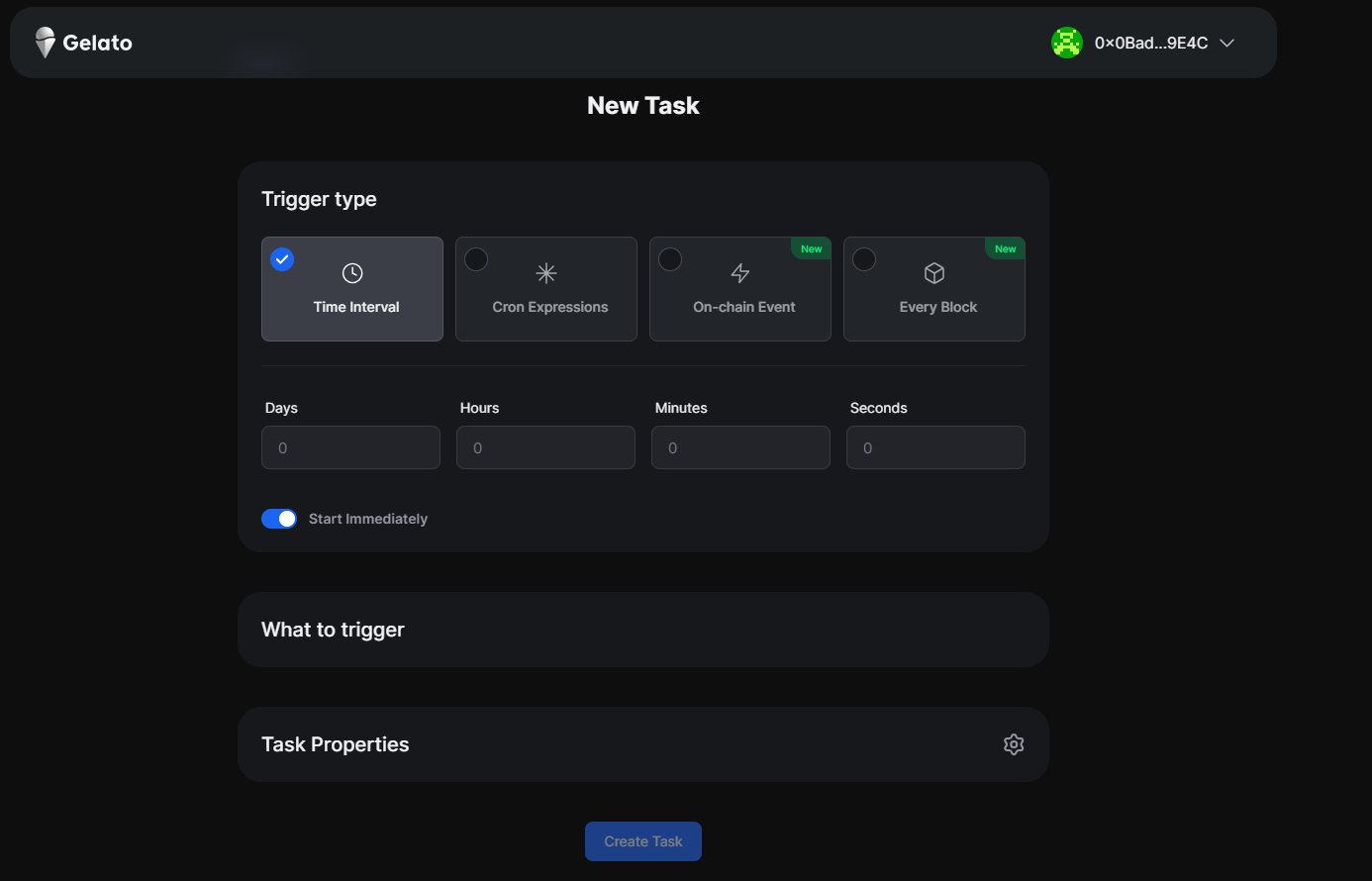
Triggers
- Time Interval Description: Use this trigger to execute tasks at regular intervals, e.g., every 10 minutes or once every 24 hours. It's like setting a straightforward, recurring alarm.
- Cron Expressions Description: This offers a more refined control compared to the Time Interval. With cron expressions, you can set tasks to run at specific moments, such as "every Tuesday at 3 PM" or "on the 1st of every month". It gives you precision in task scheduling.
- On-Chain Event Description: Ideal for those wanting their tasks to respond dynamically to blockchain activities. Whenever a specified event occurs on the blockchain, this trigger springs your task into action. It's like a vigilant watcher, always ready to act.
- Every Block Description: This function operates with the rhythm of the blockchain itself, executing your chosen function each time a new block is created.
What to Execute?
Typescript Functions
Typescript Functions are decentralized cloud functions that work similarly to AWS Lambda or Google Cloud, just for web3. They enable developers to execute on-chain transactions based on arbitrary off-chain data (APIs / subgraphs, etc) & computation. These functions are written in Typescript, stored on IPFS and run by Gelato.
Solidity Functions
Solidity Functions are crucial for making on-chain tasks automatic and more efficient. They connect set conditions with specific actions in a smart contract, providing a straightforward method to turn user needs into automated processes. Consider them as a set of "if-then" rules: If certain conditions are met on the blockchain, then a specific function gets executed. This level of automation ensures that the decentralized application can operate with minimal manual intervention, providing a seamless user experience.
Automated Transaction
Automated Transaction ensures that a specific function on the target smart contract gets reliably triggered. When you pre-define the inputs, it means that every time Gelato initiates the function call, it uses consistent, predetermined arguments.
Quick Start
Writing & Deploying Typescript Functions
- Clone the hardhat-template repo
git clone web3-functions-hardhat-template
- CD into the folder and install
cd web3-functions-hardhat-template && yarn install
- Update the
index.tsin one of the examples
Web3Function.onRun(async (context: Web3FunctionContext) => {
  const { userArgs, multiChainProvider } = context;

  const provider = multiChainProvider.default();
  // Retrieve Last oracle update time
  const oracleAddress =
    (userArgs.oracle as string) ?? "0x71B9B0F6C999CBbB0FeF9c92B80D54e4973214da";

  // YOUR CUSTOM LOGIC
  .....

  // Return if nothing has to be pushed on-chain
    return { canExec: false, message: `Coingecko call failed` };

  // Return if tx has to be pushed on-chain
  return {
    canExec: true,
    callData: [
      {
        to: oracleAddress,
        data: oracle.interface.encodeFunctionData("updatePrice", [price]),
      },
    ],
  };
});
- Deploy the Web3 Function to IPFS and create the Task
npx w3f deploy web3-functions/YOUR-FUNCTION/index.ts
Result:
$ npx w3f deploy web3-functions/YOUR-FUNCTION/index.ts
 ✓ Web3Function deployed to ipfs.
 ✓ CID: QmYMysfAhYYYrdhVytSTiE9phuoT49kMByktXSbVp1aRPx

To create a task that runs your Web3 Function every minute, visit:
> https://beta.app.gelato.network/new-task?cid=QmYMysfAhYYYrdhVytSTiE9phuoT49kMByktXSbVp1aRPx
✨  Done in 3.56s.
Finally, go to the Gelato App, create a new task, decide on the trigger, and input the CID.
Writing & Deploying Solidity Functions
The central part of a solidity function is the Checker. A Checker acts as a bridge between conditions and smart contract executions. Its purpose? To check conditions and determine whether a task should be executed by Gelato. Every checker returns two main things:
- canExec (Boolean): Indicates if Gelato should execute the task.
- execData (Bytes): Contains the data that executors will use during execution.
Once you have deployed your checker, go to the Gelato App, create a new task, decide the trigger, and input the address of the checker contract and the method that does the check.